NVIDIA's Hardware Line Looks Like a Catalog. It's One Architecture in Many Boxes.
Pradeep Kaushik·Jul 19, 2026·Untangle·12 min read·Updated Sep 10, 2026
In this article 8 sections
I keep getting asked what hardware to consider for a digital twin, from a developer prototyping at a desk to a production deployment. My answer used to arrive as a pile of product names and caveats. I needed a way to connect those names to the work the machine would do.
The clearest sign I was missing a model: three products are all called DGX, the Spark, the Station, and a rack DGX in a data center, and I’d assumed they were the same kind of thing at three sizes. They aren’t. Spark is a box that fits in your hand. A rack DGX needs its own data-center power and cooling. Station sits between them but isn’t a scaled-up Spark either. If three products sharing a name could be that far apart, I didn’t have a model. I had a pile of memorized trivia that fell over the moment I pushed on it.
I read and asked people who work closer to the hardware until I could organize the choices. These are the notes that helped me approach the catalogue from the software side.
The one idea that did the untangling
NVIDIA sells plenty of distinct chips and systems. What makes the catalog readable is that it has fewer organizing principles than product names. Each generation introduces an architectural and software lineage that shows up across many kinds of computer: cards, modules, desktop systems, servers, and racks. The architecture is a codename, Blackwell right now, with a mid-cycle “Ultra” refresh (Blackwell Ultra) and the next letter, Rubin, ramping in the back half of 2026. Each generation is named after a scientist, and a new one lands roughly once a year.
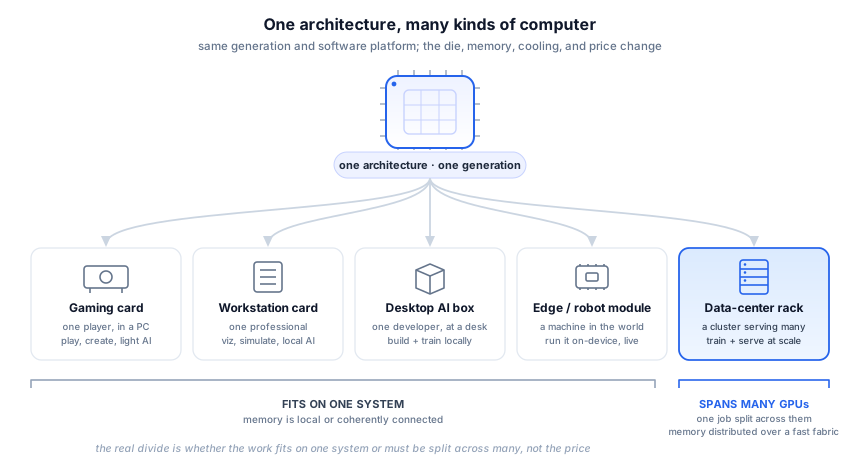
The same Blackwell generation shows up as a gaming card, a workstation card, a small desktop box, a robot brain the size of a paperback, and a liquid-cooled rack that draws more power than a street of houses. But sharing a generation isn’t the same as sharing a chip. A gaming Blackwell and a data-center Blackwell don’t use the same die or memory system; they’re specialized for different jobs in one family. The generation and the software platform stay constant; the die, memory, interconnect, power, and price all change. That reordered the catalog for me. I’d been memorizing products when I should have been asking which kind of computer a given architecture was wearing.
One architecture fans out into a ladder of form factors. The first four are a single unit where the memory stays local; the rack is many GPUs wired together to split one job across them. Memory, rather than price, separates a single computer from a roomful working together.
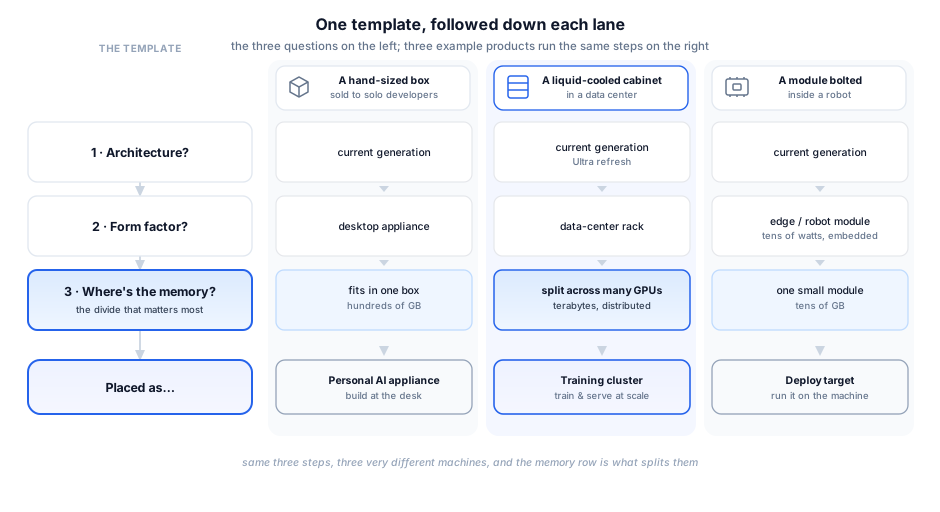
Once I saw that, placing any new product came down to three questions:
What architecture? Which generation it is: the current Blackwell and its Ultra refresh, the prior Hopper and Ada Lovelace lines still running in most clouds, the older Ampere parts (the A100 era) that are still doing real work, or the next one, Rubin. This gives you the generation and the rough capability tier.
What form factor? (Loose card, workstation, desktop appliance, edge module, or rack system.) This tells you who buys it and how it’s cooled and wired.
Where does the memory live, and what has to cross an interconnect? GDDR versus HBM sets each processor’s local bandwidth and capacity; PCIe versus NVLink sets how fast processors trade data. What matters is whether your work fits in one GPU’s memory or has to be split across several, because that’s when the interconnect becomes part of the problem. It’s the biggest divider between a single box and a room of chips working together.
Those questions help me identify a product. Choosing one starts with the workload: which operations it runs, how much memory they need and what must move between devices. A later SplatStage run made that distinction concrete.
The three questions as a template, then run down three lanes. Same steps every time; the answers land three very different machines, and the memory row is what splits them. The same template also works on a product you've never seen.
What the SplatStage run actually needed
In SplatStage, my Gaussian-scene editing and composition application, the Garden run exposed several different resource needs. It used a remote host with an L40S, but editing and diagnostics ran on the CPU. My Mac’s browser drew the navigation view. The L40S was used for the optional full server render.
Storage was easy to underestimate. Garden occupied about 3.3 GB across three PLY versions, and the host held 62 GB across 22 assets and their versions. Each committed edit wrote another complete file. Buying a larger GPU would not change that storage requirement.
For an editing setup, I would first check CPU time, RAM and space for the version history. If I needed the full server renderer, I would then measure its GPU memory and response time on the largest scene I expected to use. The captured host shows one configuration that ran the work; it does not establish the minimum hardware required.
I do not have a matched workstation run or a utilization record that settles buy versus rent. That comparison needs the same scene, operations and render settings on both machines, plus the hours I expect to keep them running. I would include storage, transfer and idle time in the rental estimate, and the whole machine and its operating costs in the ownership estimate. Until then, naming an L40S or a workstation card is only a starting point.
The ladder, one rung at a time
The whole line is a ladder from “one card in your PC” to “a room full of chips wired to work on one job.” Five rungs cover it.
Consumer card ($). A gaming GPU (NVIDIA’s GeForce line) you slot into a PC: GDDR memory, PCIe, no shared-memory fabric. Gamers, hobbyist AI, indie developers. The cheapest way into the architecture, and plenty for a lot of local AI tinkering.
Pro workstation card ($$). The same idea (NVIDIA’s RTX PRO line) with more memory, error-correcting memory, and certified professional drivers. For engineers and artists who also want to train or run models locally. The extra memory holds scenes and models the gaming card can’t.
Personal AI appliance ($$). Here the product stops being a card and becomes a sealed box. The small one is an “AI PC” for a solo developer, with enough unified memory to fine-tune real models locally. The bigger deskside version caught me off guard: a desktop superchip with hundreds of gigabytes of coherent memory, enough for models up to roughly a trillion parameters, under your desk rather than in a data center.
Edge and robotics module ($–$$). A whole computer shrunk onto a small board (NVIDIA’s Jetson line) that draws tens of watts and gets bolted inside a machine. This is the robotics rung, and it’s the one I care most about, so it gets its own section below.
Data-center system ($$$$). An 8-GPU server board up to a full rack that wires dozens of GPUs together, tens of terabytes of memory across the rack, liquid-cooled, drawing more than a hundred kilowatts. Cloud providers and big AI data centers.
That’s the answer to my DGX confusion: three different rungs that happen to share one name. The small one is the AI Mac mini, the deskside one is a data-center-class node under your desk, the rack is the factory floor. They all say DGX because that’s the training brand, and training now happens everywhere from a desk to a data center.
Reading the names, briefly
A few clues make the data-center names easier to read, as long as you treat them as clues rather than a grammar that covers every product. A leading “G” means a Grace CPU is packaged with the GPU, so B200 is a bare GPU and GB200 is Grace plus Blackwell, joined by a coherent link rather than fused into one die. NVL and a number is the GPU count wired into one system, as in NVL72. And HGX is the integrated GPU platform and baseboard that system makers build on, while DGX is NVIDIA’s own complete system, usually with the same class of GPU inside.
Several generations remain in use at once. My own Omniverse instance runs on an Ada-generation L40S, so a current product name is not enough to identify the hardware behind a cloud instance.
Where the model bends
This model helps me, but it bends in three places.
The first is the architecture name. A gaming Blackwell and a data-center Blackwell are different dies, so sharing a generation doesn’t mean sharing features, memory, or performance. The name places a product in a generation and a software ecosystem, little more.
The second is the word “superchip.” The GB200 Grace Blackwell Superchip pairs one Grace CPU with two Blackwell GPUs. They stay distinct processors; NVLink-C2C just gives them a fast, coherent connection. That is a package rather than a CPU melted into a GPU.
The third is rack-scale language. The GB200 NVL72 links 36 Grace CPUs and 72 Blackwell GPUs into one NVLink domain, often called “one giant GPU.” That tells you why the fabric matters, but it’s an analogy: software still sees many processors, local memory, and placement decisions. NVLink makes them cooperate closely; it doesn’t make them one chip.
None of this breaks the model. It just means the names are hints rather than rules, and past a point you have to look at the actual system instead of the label.
Where Omniverse and robotics sit
There’s a reason the line is shaped this way, and NVIDIA’s own “three computers” framing makes it clearest. It’s where the parts I work on live. The idea is that physical AI needs three distinct machines: one to train the model, one to simulate it in a digital twin before it touches reality, and one to deploy it on the physical machine. Those map almost one-to-one onto the ladder.
Training is the appliance-to-rack rung, desktop up to data center. Simulation is where Omniverse runs, and it’s the side of the workstation line I’d underrated. When I hear “workstation GPU” I think graphics, but the pro cards and the servers built from them are the Omniverse box: they build the digital twin and generate the synthetic data you can’t capture enough of by hand, which the whole training loop depends on. Easy to wave off as “just workstations,” which is the mistake I made, when it’s the same silicon as the graphics card doing a different job.
Deployment is the robotics module, the rung I’d most misjudged from the software side. The current Jetson brain, Thor, does more than two thousand FP4 TFLOPS in a 40-to-130-watt envelope with 128 GB of memory, about seven and a half times its predecessor, Orin. Its 128 GB of memory and FP4 support make it practical to run a sizable vision-language-action model on the robot itself, in real time, with no network in the loop. The older Orin module is still widely used and often the cheaper, proven choice, with a ruggedized, safety-certified cousin for medical and industrial edge. But the new brain is what moves robots from “perception at the edge” to running a real foundation model on-board, the deploy target the physical-AI bottleneck piece was circling: the policy has to close its loop in milliseconds on whatever compute rides on the machine.
Seen this way the ladder is a pipeline. You train on data-center compute, simulate and generate data on the workstation and Omniverse rung, deploy to the module on the robot, and the robot’s real-world data flows back into the next run. One architecture, three jobs: build at the desk, scale the training in the data center, run the result out in the world.
One thing makes that pipeline workable from the software side: a lot travels with you. CUDA, the common libraries, containers, and model formats move across the rungs, so you can prototype locally, train elsewhere, and target an edge box without swapping your toolchain. But portability doesn’t mean sameness: the same code won’t always give the same binary, features, or performance, and a model that fit on one GPU may need parallelism once it outgrows the device. The software lineage lowers the cost of moving; the hardware topology decides what happens after you move.
This came up while I was planning an Omniverse dev setup: rent a cloud instance, or put a workstation card in a box on my desk? The L40S in AWS’s g6e and the RTX 6000 Ada workstation card share an Ada GPU design, but that does not make the complete machines interchangeable. I still need to compare memory, CPU, storage and performance on my workload before deciding whether usage justifies owning the box.
One caveat: check the generation before you assume two cards match. Today g6e still rents the Ada-era L40S, while the current workstation card is a generation ahead on Blackwell. The logic holds either way; which silicon you’re comparing just depends on the year.
Reading the memory number
The one place the ladder can still trip you is the memory number, because it’s measured at different levels. A card’s figure is GPU memory alone; a deskside appliance’s is coherent CPU-plus-GPU memory; a rack’s adds up the memory across all its GPUs. So a “96” on one rung and a “700-something” on another aren’t the same unit, and comparing them at face value is a trap.
The line is whether your work fits on one device. If it fits on a single card or box, more memory only raises the ceiling: bigger models and batches, same work, and if most of the critical data stays local, the interconnect matters much less. Once it doesn’t fit, you have to split the work across GPUs, and the interconnect becomes the bottleneck. NVLink and NVSwitch move data between GPUs far faster than PCIe, fast enough to run a very large model across many of them. But the memory stays physically distributed: even in a rack-scale NVLink domain, each GPU’s own memory is closest, and the fabric makes the rest reachable quickly, though never as fast as local. The GPUs stay separate chips; the fabric just lets them work together well.
Where exactly that line falls depends on the model and how you split it, and that part I’d still argue about. But the shape holds: if the work fits on one device, capacity is the main question; once it has to be divided, topology, communication, and software all become part of the problem too.
How I actually decide
I no longer start from “which product should I buy?” I start from four constraints, and the product usually falls out of them: what part of the workflow it runs, how much local memory that needs, whether it has to scale across more than one device, and whether I want to own the box or rent it. The generation barely enters until the end. One honest bias: the parts I know best are all NVIDIA, so treat any name I reach for as a default, not a bake-off result.
Training, simulation and deployment can need different hardware, but a project does not have to buy every rung. I would identify which work needs to run locally, which can use shared or rented compute, and which must run on the robot. The workload comes before the product name.
Disclaimer: The views and opinions expressed in this account are those of my own and do not represent those of my employer, NVIDIA.